 Free shipping over £99


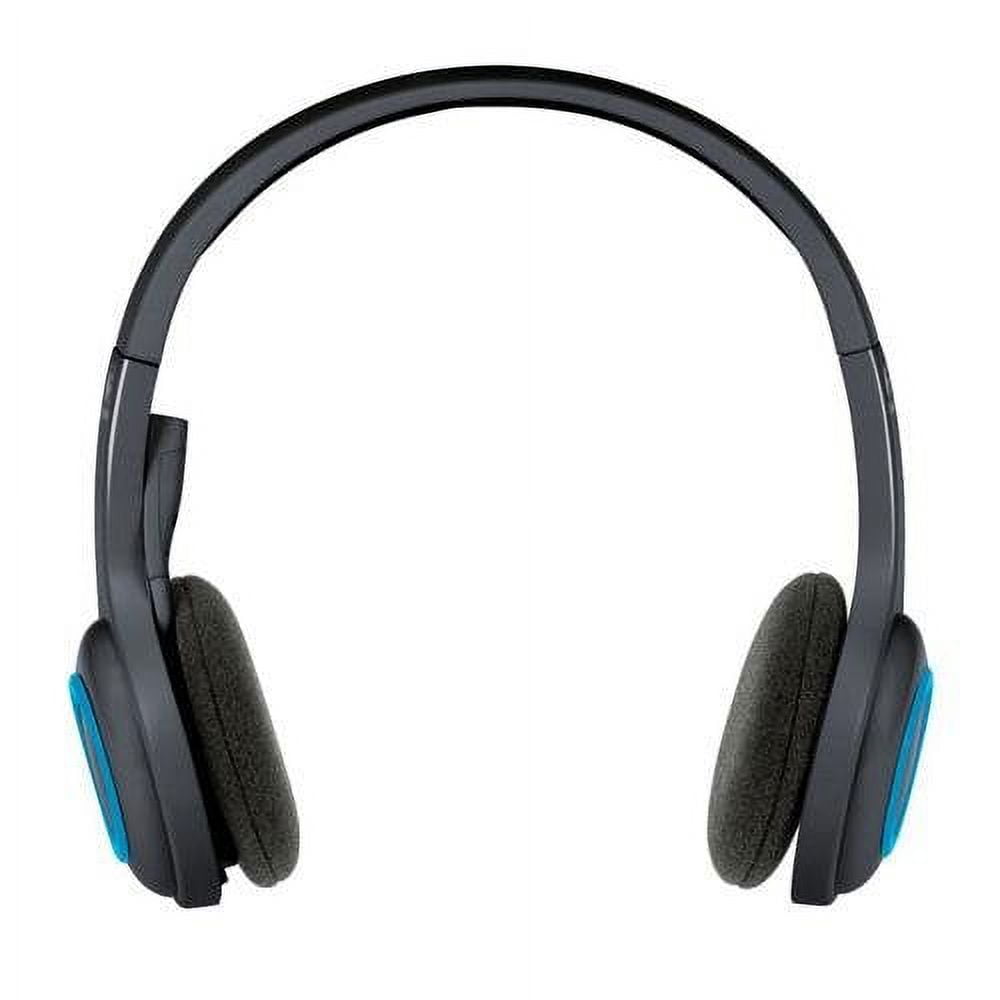


Logitech Wireless Headset H600
£15.85
- Sold as 1 Each.
- Insert the leave-in nano receiver into a USB port and move freely around home or office, up to 33 feet (10 m) away from your computer. Enjoy up to six hours of wireless audio with the rechargeable battery. Adjustable padded headband with swivel-mounted foam ear cushions are ultra-comfortable even after hours of listening. Headset folds up easily for portability.
- Laser-tuned drivers provide enhanced, digital audio for full immersion in music, games and calls.
- Flexible mic can be positioned for better voice capture and background noise reduction. Right-sided boom can be tucked inside the headband and out of the way when you’re not using it.
- Power on and off, adjust the volume or mute your calls with simple on-ear controls located on the right ear cup. Store the nano-receiver along bottom of the left ear cup when you’re on-the-go.
You can wirelessly from your computer with the Logitech Wireless Headset H600. Now you can be free to enjoy listening to music or taking calls without dealing with traditional leads. This wireless headset for computers works up to a generous 10 meters from your PC. With its laser-tuned speaker drivers, you can count on superior audio quality. They are complemented by an attached noise-cancelling Microphone. This ensures that whoever is on the other end of the call hears you as well as you can listen to them. The H600 Logitech headset also features a rechargeable battery with a six-hour life so your audio enjoyment will last a long time. Make yourself comfortable on the couch as you rest the set softly on your head, thanks to an adjustable band and foam ear cups. As long as you’re in range of your PC, the conveniently built-in nano wireless receiver will make sure your call or music is excellent.
- Color: Black
- Manufacturer Part Number: 981-000341
- Assembled Product Weight: 0.751 lb
- Brand: Logitech
- Features: Microphone Included
- Assembled Product Dimensions (L x W x H): 3.00 x 7.00 x 10.00 Inches
You may also like…
![3Pack Long Lightning Charger Cables (3/6/6ft), Nylon Fast Lightning Charging Cord Compatible with iPhone 13/13 pro/12/11/11 Pro/X/Xs Max/XR [Apple MFi Certified], Red](https://image.icusmartsolutions.co.uk/wm/3/3Pack-Apple-MFi-Certified-iPhone-Long-Lightning-Charger-Cables-3-6-6ft-Nylon-Fast-Charging-Cord-Compatible-13-13-pro-12-11-11-Pro-X-Xs-Max-XR-iPad-Ai_18c89bcb-73ec-4c61-9057-190542a179e7.4088efc37687a254b4fa5a49396deeac.jpeg)

- Model: IphoneUSB
- Brand: Cshidworld
- Connector Type: Lightning
- Cable Length: 78.74 in
- Compatible Brands: Apple
- Manufacturer Part Number: IphoneUSB
- Assembled Product Dimensions (L x W x H): 3.93 x 0.10 x 1.96 Inches


- Digital Stereo Sound: Fine-tuned drivers provide enhanced digital audio for music, calls, meetings and more
- Rotating Noise Canceling Mic: Minimizes unwanted background noise for clear conversations; the rotating boom arm can be tucked out of the way when you’re not using it
- Handy In-line Controls: Simple in-line controls on the headset cable let you adjust the volume or mute calls without disruption
- Plug-and-Play USB Computer Headset: Simply plug the USB-A connector into your computer and you’re ready to talk or listen without the need to install software
- Padded Comfort: Comfortable headphones with adjustable headband features swivel-mounted, leatherette ear cushions for hours of comfort and is easy to clean
- Move Freely With Long Cable: The 6.23 ft (1.9 m) USB A cable is just the right length to give you the freedom to stand up and stretch during long conversations
- Works With Chromebook: H390 headphones are tested and certified, which means it meets Google’s compatibility standards and works seamlessly with your Chromebook
- Sustainable Design: Plastic parts in H390 Logitech Headset includes post-consumer recycled plastic (23%*); uses FSC-certified paper for responsible packaging


About this item
- Versatility Bottom: with 1/4″ screw hole, can be used with the removable 1/4″ hot shoe adapter (Package Includes) Top With 1/4″ screw, widely applicate for camera ,flash light, light stand, tripod etc. The combination of this mini ballhead and other light stands can be used as a Vive stand. Note: This package not includ light stand.
- Multi-angle Use 360 degree panoramic rotation; 90 degree tilt rotation; Ball head diameter is about 23mm, and it can be fixed easily by locking knob for meeting different shooting angle.
- With Locking Knob Aiming and horizon leveling can be easily accomplished. You also can use the knob to adjust to the desired angle to meet your needs at different angles.
- Max Weight Capacity 5.5lb weight capacity; Material: plastic+metal; With rubber-padded mount on the top to protect your camera from potential scratches between your camera and the mounting part.
- Light Weight & Portable Weight: 0.18lb(85g) / Pc; Size 2.55in*0.67in*0.67in (65*17*17mm / Pc, small size and lightweight, easy to carry. Package includes:2 Pack mini ball head; 2* removable 1/4″ hot shoe adapter.


NBD Digital 4K Ultra HD 48MP All-in-One Vlogging Camera with Wide Angle Lens, Digital Zoom 16x and 3″ Screen:
- Digital 4K Ultra HD 48MP camera
- Vlogging camera with wide angle lens
- Digital zoom 16x
- 3″ Screen
- Compact size
- All-in-one digital camera
Related Products


About this item
- Low Profile Ball Head Tripod Mount To achieve steady and shake free footage, this φ40mm metal ball head lowers its gravity for increased stability, supports a load up to 22lb/10kg, and allows greater flexibility for unique angles and perspectives. The bottom 3/8″ threaded hole can be attached to a tripod, monopod, slider, etc.
- Dual Compatibility QR System The Arca type QR plate and clamp base are also compatible with Peak Design Capture Camera Clip V3 backpack strap clip mount and the plates, enabling swift device switching between a tripod and backpack strap. Note: QR clamp compatible only with PD QR plates and included plates
- 360° Swivel & 90° Tilt The single U notch design on the ball head ensures 360° panoramic and 90° vertical shooting in a flexible yet stable way, with a flip lock for quick, easy switch between portrait and landscape modes. A built in bubble level helps check the stability after each adjustment
- Multiple Mounting Threads The 1/4″ top mounting screw is compatible with mirrorless cameras, compact cameras, smaller DSLRs, action camera adapters, phone holders, and more (all not included). Extra 1/4″ screw holes on the QR plate and clamp base allow easy mounting of LED lights, monitors, and magic arms for versatile content creation
- Compact & Portable Engineered with premium CNC machined aluminum alloy, the compact tripod head adapter ensures durability and high performance under different circumstances. Measuring 3.3″x2.9″x2.4″/85x73x61mm and weighing just 10.8oz/305g, easily fits in your pocket, and carry it with ease wherever you go, perfect for outdoors or filming on the go


HP 61 ink cartridge is designed for use with Hewlett-Packard Deskjet 1000, 1050 Series, 1055 Series, 2050, 2510, 2512, 3000, 3050, 3052A and 3054 Series.


- Audio Feature: Clean Bass
- Number of Channels: 2.1
- Features: Maximum Acosutic Output: 106 dB SPL, High Frequency Horn: 90�� x 40�� MicroTractrix Horn, Amplifier: Digital/Linear A/B Amplifier with Discrete MOSFET Output Power Section, Satellite: ABS, Subwoofer: MDF, Satellite: Sealed, Subwoofer: Bass Reflex, Volume
- Count: 1
- Manufacturer Part Number: PROMEDIA 2.1
- Model: 2.1
- Audio Power Output: 200
- Brand: Klipsch
- Assembled Product Dimensions (L x W x H): 25.00 x 14.00 x 15.00 Inches


- Sleep better: Personalize a sleep-wake routine to help you fall asleep, stay asleep & wake up refreshed.
- Wake up naturally: Gently wake to a custom Sunrise Alarm Clock that supports healthy cortisol levels.
- Sounds + lights + more: Create a mood anytime with a library of soothing sounds, white noise & lights at your fingertips. Relax with a soft-glow reading light without the eye-straining blue hues.


About this item
- SOLID CONSTRUCTION: Made of metal with solid construction, it is durable and tough enough for photography and videography
- 360 DEGREE ROTATION BASE: With 1 Panning knob and 2 locking knob, they can set your camera at different angle; With band scale, the locks can be controlled more accurately and achieve quick location shooting
- FINE TUNING DAMPING: Protect your device from sudden plunge while doing versatile angle shooting
- MORE FLEXIBILITY: 3/8 inch screw thread hole is for connecting tripod, monopod, slider and other stands; 1/4 inch quick shoe plate is for most DSLR cameras and camcorders; Compatible with Sony Canon Nikon and other DSLR cameras. It is easy to set up and take down
- Note: Tripod Ball Head ONLY. Camera and Tripod are not included
Millie Wolf –
The headset is really light and sounds great. There is a good range for volume. I usually have it high for my candy crush games. The adjustable part of the headset is also good. The power button and the volume adjustments are in a good location. I would purchase this headset and be good with its funtionality.
[...]Edythe Bradtke DVM –
I’ve wanted a wireless headphone for ages and fortunately came upon one today. Logitech has been making electronics for years, so I have some confidence in them. Also, I read a LOT of reviews on other websites about this brand and model, to make sure it is the right one for me.
Since this was my first wireless headset, there was some learning involved. I watched a few youtube videos about it, also how to link my Apple mac mini to the headset. Unfortunately, it can’t link to my iPad.
This model, H600, has a small dongle that can be stored in the base of the left speaker when not in use. It has a USB fitment for insertion into your desktop/laptop/playstation, etc. Insert this into an available USB slot.
It also comes with a 27″ long charging cable. You will need to charge it a couple hours before using. Pink light flashing=charging. No light=charged.
Once charged, turn the headset On (slide switch). Then hold down the bluetooth pairing button for 5 seconds or so. The small (green?) blue light will stay on. It is now ready to pair.
For Mac, I went to System Preferences>Bluetooth, found the entry “Logitech H600 Headset” and clicked on it. Voila! Connected!
The sound seems fine to me. Not a lot of bass, to be sure, but I wasn’t expecting that either. There are no bass/treble adjustments available.
The volume adjustment is a simple round circle with + and – toggle up/down. Some reviews have claimed that the bluetooth pairing button doubles as a mute button for the microphone. I can confirm this is the case.
On my mac, System Preferences>Sound>H600 Logitech Headset>Input>Bluetooth, gave me the visual proof that when speaking, mute is activated when the bluetooth button is pushed. You will get a small two-tone chime telling you as well.
I haven’t done any phone calls, voice recording, etc. using the boom mike. I just know it works from the visual display on my computer. It is voice activated and noise canceling.
The headset is quite light weight, adjustable for most head sizes and has cushioned ear pads. I wore it for a couple hours yesterday and it was far more comfortable/bearable than other headsets I’ve had. That said, I would not call these super-comfortable. They are OK. In a professional setting, you could justify a step or two up.
These seem durable, well-made and come with a two year warranty, which is nice. I went to logitech.com>support, and registered with serial number, etc.
The included instructions were minimal. Most of it you can figure out pretty easily, such as the receiver/transmitter dongle, but as mentioned earlier, check out a few youtube videos for more information about the model and how to pair with your computer.
I would recommend this item and would buy it again.
[...]