 Free shipping over £99


Huion KAMVAS 13 Graphics Drawing Tablet with Screen, 13.3″ Pen Display for Android, Mac, PC, Linux, Adjustable Stand
Price range: £77.03 through £85.55
- Features: Scratch-Resistant
- Brand: Huion
- Manufacturer Part Number: GS1331-Black-Stand
- Manufacturer: Huion
- Color: Black
- Assembled Product Weight: 2.16 lb
- Model: GS1331
- Assembled Product Dimensions (L x W x H): 14.40 x 8.50 x 0.50 Inches
The Huion KAMVAS 13 Drawing Tablet with Screen offers a high-quality digital drawing experience. With its full laminated IPS LCD display, you’ll enjoy vibrant colors, wide viewing angles, and precise cursor positioning. The battery-free stylus provides 8192 levels of pressure sensitivity and tilt function for natural, responsive control. Customize your workflow with 8 shortcut keys and an adjustable stand. Easily connect to your Mac, PC, or Android device via HDMI or USB-C. Portable and lightweight at just 980g, the KAMVAS 13 is perfect for creating on the go.
-
- Full Lamination Screen: Kamvas 13 is a more affordable drawing monitor with a full laminated IPS screen, seamlessly combining the glass and screen to bring precise cursor positioning and the lowest parallax. Features a 1920 x 1080 FHD display with 16.7 million colors, 120% sRGB (85% NTSC) color gamut volume, and 178° viewing angle. It comes with an anti-glare film that can be scratch-resistant and offers a clear picture under bright light.
-
- Advanced Pen Technology: Battery-free Stylus PW517 is optimized with a Capacitive Pressure Sensor and stable pen nibs providing you the most natural and highly-sensitive drawing experience as using a regular pen. Together with 8192 levels of pen pressure, 60 degrees of tilt function, and 266pps of report rate, PW517 immediately reacts to the tilt and each movement of your hand with amazing precision and control.
-
- Optimize your Workflow: 8 shortcut keys are designed on the left to be customized as needed. It is devoted to simplifying your workflow and creating your ideas faster and more efficiently. You could draw with Kamvas 13 in any creative software including Illustrator, Photoshop, Painter, SAI, Krita, and so on!【 An adjustable stand is included】 to allow you to create at your best angle.
-
- Strong compatibility: The Kamvas 13 pen display could work with Mac, Windows, and Linux. The portable drawing tablet is easy to carry for outdoor drawing. Kamvas 13 drawing pen display is not a standalone product, it must be used with a computer or Android device that runs Windows, Mac, Linux, and Android OS.
-
- Easy Cable Connection: No need to connect with an AC power adapter anymore! The computer graphic tablet could be powered easily by a laptop that runs on 5 volts or above via the included 3-in-1 HDMI cables or a full-featured Type-C cable (sold separately). A USB extension cable is included to help extend the connection to your computer by 1.2m.
-
- Bring It Anywhere: The Kamvas 13 is 11.8mm ultra-slim and weighs only 980g, which makes it an easy-to-carry pen display for outdoor drawing.
| actual_color | black, green, purple |
|---|
You may also like…
![3Pack Long Lightning Charger Cables (3/6/6ft), Nylon Fast Lightning Charging Cord Compatible with iPhone 13/13 pro/12/11/11 Pro/X/Xs Max/XR [Apple MFi Certified], Red](https://image.icusmartsolutions.co.uk/wm/3/3Pack-Apple-MFi-Certified-iPhone-Long-Lightning-Charger-Cables-3-6-6ft-Nylon-Fast-Charging-Cord-Compatible-13-13-pro-12-11-11-Pro-X-Xs-Max-XR-iPad-Ai_18c89bcb-73ec-4c61-9057-190542a179e7.4088efc37687a254b4fa5a49396deeac.jpeg)

- Model: IphoneUSB
- Brand: Cshidworld
- Connector Type: Lightning
- Cable Length: 78.74 in
- Compatible Brands: Apple
- Manufacturer Part Number: IphoneUSB
- Assembled Product Dimensions (L x W x H): 3.93 x 0.10 x 1.96 Inches


About this item
- Versatility Bottom: with 1/4″ screw hole, can be used with the removable 1/4″ hot shoe adapter (Package Includes) Top With 1/4″ screw, widely applicate for camera ,flash light, light stand, tripod etc. The combination of this mini ballhead and other light stands can be used as a Vive stand. Note: This package not includ light stand.
- Multi-angle Use 360 degree panoramic rotation; 90 degree tilt rotation; Ball head diameter is about 23mm, and it can be fixed easily by locking knob for meeting different shooting angle.
- With Locking Knob Aiming and horizon leveling can be easily accomplished. You also can use the knob to adjust to the desired angle to meet your needs at different angles.
- Max Weight Capacity 5.5lb weight capacity; Material: plastic+metal; With rubber-padded mount on the top to protect your camera from potential scratches between your camera and the mounting part.
- Light Weight & Portable Weight: 0.18lb(85g) / Pc; Size 2.55in*0.67in*0.67in (65*17*17mm / Pc, small size and lightweight, easy to carry. Package includes:2 Pack mini ball head; 2* removable 1/4″ hot shoe adapter.


NBD Digital 4K Ultra HD 48MP All-in-One Vlogging Camera with Wide Angle Lens, Digital Zoom 16x and 3″ Screen:
- Digital 4K Ultra HD 48MP camera
- Vlogging camera with wide angle lens
- Digital zoom 16x
- 3″ Screen
- Compact size
- All-in-one digital camera


- Digital Stereo Sound: Fine-tuned drivers provide enhanced digital audio for music, calls, meetings and more
- Rotating Noise Canceling Mic: Minimizes unwanted background noise for clear conversations; the rotating boom arm can be tucked out of the way when you’re not using it
- Handy In-line Controls: Simple in-line controls on the headset cable let you adjust the volume or mute calls without disruption
- Plug-and-Play USB Computer Headset: Simply plug the USB-A connector into your computer and you’re ready to talk or listen without the need to install software
- Padded Comfort: Comfortable headphones with adjustable headband features swivel-mounted, leatherette ear cushions for hours of comfort and is easy to clean
- Move Freely With Long Cable: The 6.23 ft (1.9 m) USB A cable is just the right length to give you the freedom to stand up and stretch during long conversations
- Works With Chromebook: H390 headphones are tested and certified, which means it meets Google’s compatibility standards and works seamlessly with your Chromebook
- Sustainable Design: Plastic parts in H390 Logitech Headset includes post-consumer recycled plastic (23%*); uses FSC-certified paper for responsible packaging
Related Products


About this item
- SOLID CONSTRUCTION: Made of metal with solid construction, it is durable and tough enough for photography and videography
- 360 DEGREE ROTATION BASE: With 1 Panning knob and 2 locking knob, they can set your camera at different angle; With band scale, the locks can be controlled more accurately and achieve quick location shooting
- FINE TUNING DAMPING: Protect your device from sudden plunge while doing versatile angle shooting
- MORE FLEXIBILITY: 3/8 inch screw thread hole is for connecting tripod, monopod, slider and other stands; 1/4 inch quick shoe plate is for most DSLR cameras and camcorders; Compatible with Sony Canon Nikon and other DSLR cameras. It is easy to set up and take down
- Note: Tripod Ball Head ONLY. Camera and Tripod are not included


About this item
- 360 Degree Swivel Panoramic Shot Our tripod ball head not only 360 degree rotation, but also panoramic shot. It can adjust ball head angle by the turn knob, you can set your camera at any different angle according to your needs.
- Universal Clamping Platform Mini ball head designed with universal clamping platform, CNC precision finishing, you can easy to set up and remove in seconds, it has both horizontal and vertical bubble level to enhance perception of position.
- Sturdy & Durable Our camera ball head made of aluminum alloy, very strong, durable, and corrosion-resistant. With rubber-padded mount on the top to protect your camera from potential scratches Maximum load capacity is 6.6lb/3kg.
- Wide Use The ball head mount has 20mm ball diameter which allows for more stable and flexible adjustment, 1/4 ” camera thread screw making it suitable for a wide variety of most digital DSLR cameras Video Cameras, camcorders, tripods, sliders, monopods.
- Package Inluding It come with 1* mini ball head, 1* E-shaped mobile phone clip, 1* Gopro screw, 1* 1/4” screw. Weighing only 170g, ultra lightweight, extremely useful for photograph and videograph. If you have any question, please contact us at any time : )
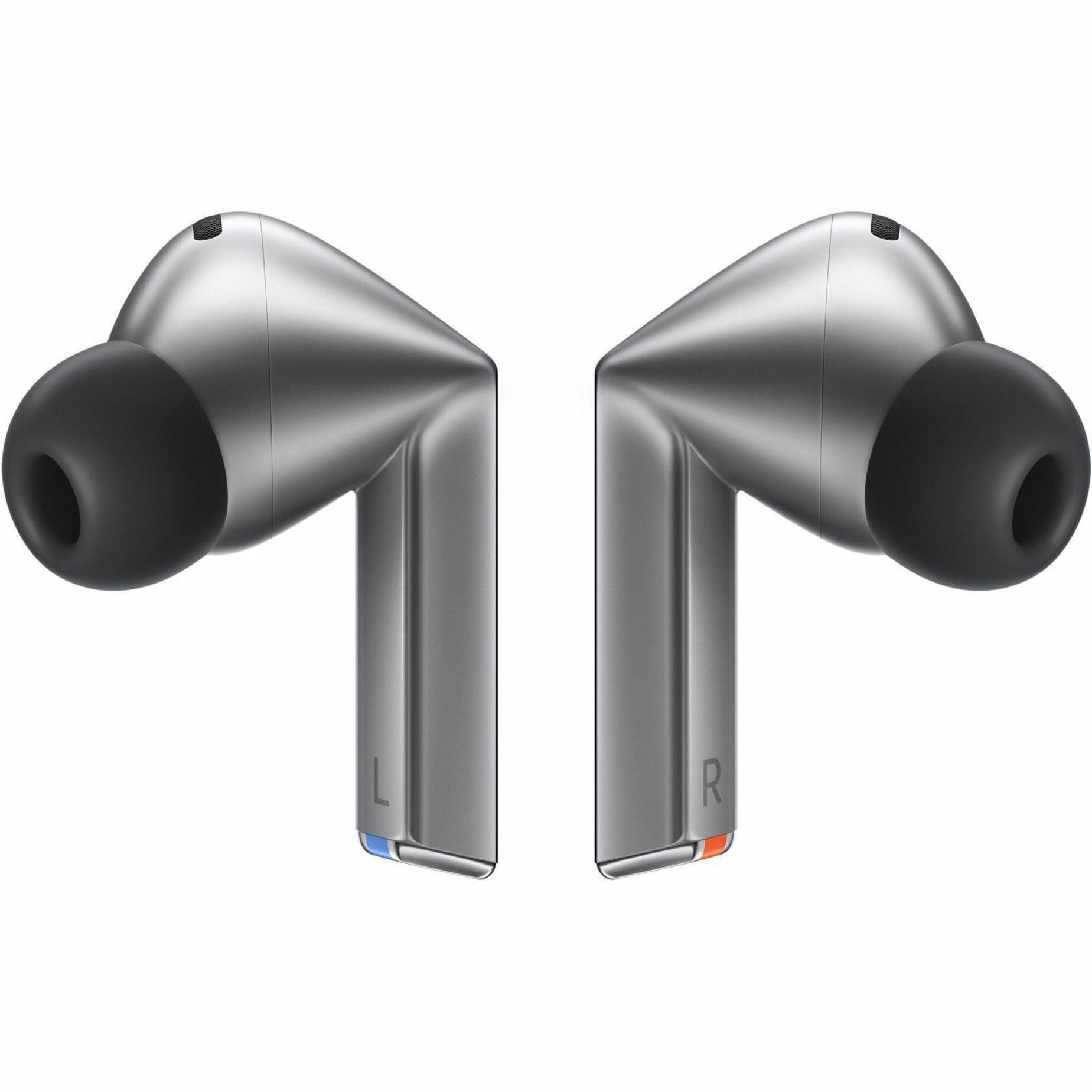

- Color: Silver
- Manufacturer Part Number: SM-R630NZAAXAR
- Assembled Product Weight: 0.32 lb
- Brand: Samsung
- Assembled Product Dimensions (L x W x H): 3.50 x 4.80 x 1.60 Inches


About this item
- Low Profile Ball Head Fully compatible with NEEWER LITETRIP tripods, the φ40mm low profile ball head lowers its gravity for increased stability and supports a load up to 22lb/10kg, and allows greater flexibility for unique angles and perspectives. With a bottom 3/8″ threaded hole, the ball head mount can also be attached to other tripods, monopods, sliders, etc.
- Quick Lock Dual Compatibility QR System The camera ball mount features the Arca type QR plate and the clamp base that are also compatible with Peak Design Capture Camera Clip V3 backpack strap clip mount and the plates, facilitating swift device switching between a tripod and backpack strap with the side quick lock button. Note: The QR clamp is only compatible with PD QR plates and included plates
- 360° Swivel & 90° Tilt The panoramic ball head with a single U notch design for 360° rotation and 90° vertical shooting in a flexible yet stable way, with a flip lock for quick, easy switch between portrait and landscape modes. Precise scale markings on the head with a locking knob for more accurate and smooth horizontal movement
- Multiple Mounting Threads The top 1/4″ screw on the tripod head is compatible with mini DV camcorders, DSLRs, mirrorless cameras, telephoto lenses, sliders, smartphones, and more. A built in bubble level on the QR clamp base helps check the stability after each adjustment
- Lightweight & Portable Engineered with premium CNC machined aluminum alloy, the tripod ball head ensures durability and high performance under different circumstances. Measuring 3.4″ x 2.9″ x 2.4″ / 86 x 73 x 61mm and weighing just 9.7oz/275g, it easily fits in your pocket, and carry it with ease wherever you go, perfect for outdoor or filming on the go

About this item
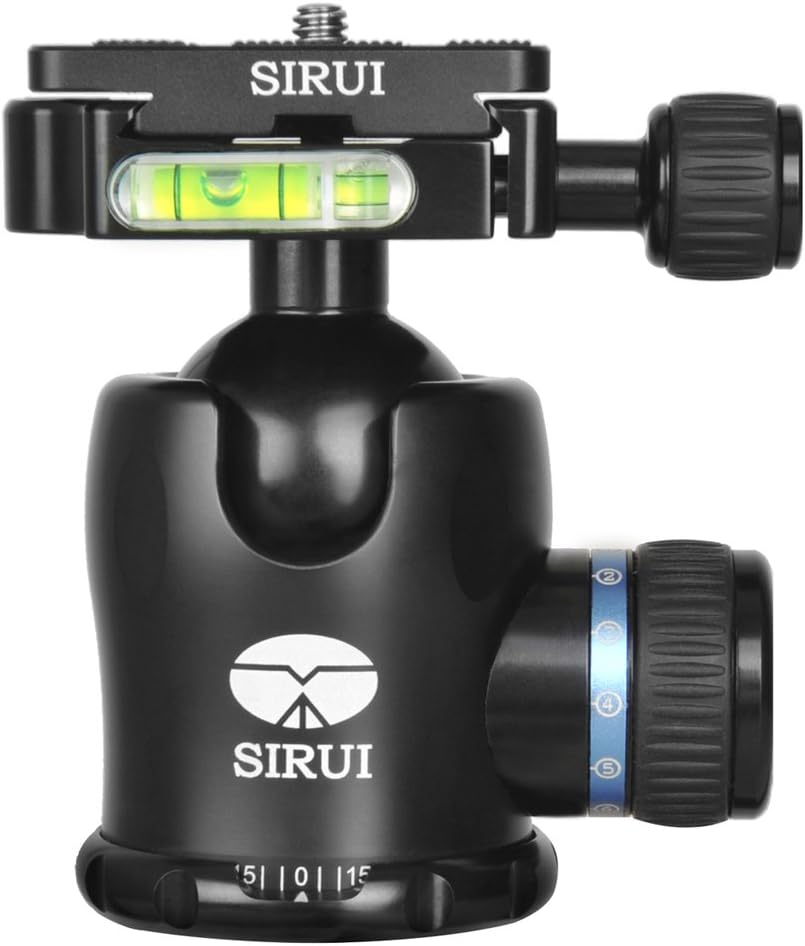
- Material and Craftsmanship : Adopting high-quality anodized aluminum alloy and advanced CNC milling technology, K-20X ball head is stable and solidly constructed with a load capacity up to 25kg/55.1lb.
- Superior Stability : K-20X ball head has enhanced stability with high-quality anodized aluminum alloy, strong locking system and 54mm/2.1inch large base diameter.
- Panoramic Photography/Flexible Adjustment : Equipped with 360°panorama base and rotatable platform, K-20X ball head can be rotated flexibly at different angles to meet the need of panoramic photography.
- Wide Compatibility : With 1/4″ screw thread on the quick release plate, the head can be easily connected to digital devices in seconds.With 3/8” screw hole at the bottom, the ball head can be attached to a tripod or monopod easily.
- Ergonomic Design : Rubber sleeve coated on the locking knobs provides precise and comfortable operation.
- Universal Applicability : K-20X can not only connected with tripod and monopod, but also with SLR camera, camera slider, camcorder, action camera, light stand, etc.
- Strong Locking System : SIRUI unique locking system, (consisting of plate knob, safety pin, base lock, ball lock and built-in friction control dial), is designed to prevent the camera from accidental sliding.
Mr. Elmer King –
This item was a birthday present for my artist ic teen , he made it work in his laptop and definitely he was so happy exploring the features of this nice drawing pad . The size of the item is great for capture those details when drawing . Of course it comes with several parts that need a little review of the manual , the teen picked fast the installation of the item . It came with stylus , a glove and more . A great device for encourage the teen creativity .
[...]Dereck Thompson V –
great tablet and easy to set up. Ive ran into 1 issue but i think its more of a windows issue then the tablet, if i try to configure the sensitivity settings when I first turn on my laptop my pen cursor will show on my desktop if im splitting the screen. unplugging and replugging fixed the cursor issue but the tablet will no longer be discoverable for the calibration even though the tablet is recating normally. other then this inconvenience that is easily fixed by setting up the pressure before unplugging and repluggung it in. great product and cant wait to see the other features it offers.
[...]Prof. Dante Bartoletti –
Very good even in the year 2024! I wanted a tablet not too expensive yet very good for the price, and its exactly what I received!! I was excited waiting for the product and i am not disappointed about the quality!!
[...]Prof. Billie Effertz III –
I have done digital drawing for years but it’s never been THIS smooth! I cannot say enough good things about it. The way the pen glides, the quick buttons, the pressure sensitivity, the clarity! All of it is definitely a new sensation.
I honestly thought what I was doing before was perfect and didn’t need an upgrade. I was wrong. My spark for drawing has been lit again. Thank you so much!
[...]